Fixed Asset Management System (FAM)
I. System Introduction
1. System Overview
- This system allows for comprehensive management of operations including listing, activation, borrowing, repairing, warehousing, discarding, damage reporting, and label printing for fixed assets. It supports saving vouchers and evidence as attachments and can generate QR codes.
- Available in two versions: Standard Enterprise Edition and Advanced Enterprise Edition (AssMan). The backend database uses SQL Server 2008 R2.
- To strengthen management, the system assigns "Procurement Department" and "Using Department" attributes to each asset to distinguish ownership, usage rights, and management obligations. It also assigns a "Physical Location" attribute for easier tracking.
2. Functional Overview
As shown in the figure below, the system consists of two components: Master Data and Fixed Asset Management. The Master Data stores basic configurations (usually maintained by the Admin). The Management component contains process forms directly operated by users.

Master Data Component includes:
- Source Type: Indicates the origin of the fixed asset (e.g., newly purchased, transferred).
- Location Classification: The type of storage location, categorized based on risk level and characteristics.
- Physical Location Table: Stores the names of all potential asset locations, represented in a tree structure.
- Depreciation Method: The methods used by the enterprise to calculate depreciation.
- Asset Category: Classifies fixed assets based on specific criteria (tree structure).
- Asset Status: Indicates the current condition, such as: In Use, Under Repair, Sealed, Damaged.
Fixed Asset Management Component includes:
- 1. Registration & Activation: Used to register and allocate newly purchased assets to specific departments.
- 2. Depreciation: Calculates monthly depreciation for fixed assets.
- 3. Borrowing Request: Requires approval when transferring assets between departments.
- 4. Repair Record: Mandatory when an asset needs to be sent outside for repair or maintenance.
- 5. Asset Damage: Used to assess loss, identify causes, and assign responsibility when an asset is damaged.
- 6. Loss: Used when a fixed asset is lost.
- 7. Scrapping / Disposal: Used when a fixed asset is discarded.
- 8. In and Out: Warehousing operations for assets that are temporarily unused and sealed.
- 9. Label Printing: Generates and prints fixed asset labels and QR codes.
- 10. Asset Transfer: Used when assets are transferred within the same department or the responsible person changes.
II. Operation Guide
1. Asset Category
An asset category includes: Category number, category name, and parent category number. Categories are organized in a tree structure based on the digit count. (For example: Levels 1 to 4 are represented by 3-2-2-2 digits respectively. For code A06010211, A06 is level 1, 01 is level 2...). Users must input this correctly when adding new categories.
2. Physical Location Table Maintenance
The physical location table includes: Location number, location name, parent location number, category, and remarks. The data is organized in a tree structure. When adding a new location (that is not a root node), you must correctly declare its "Parent Location Number".
3. Initialization and Entry
When the company purchases new assets, they must be registered and activated before allocation. This process is controlled by the Accounting department.
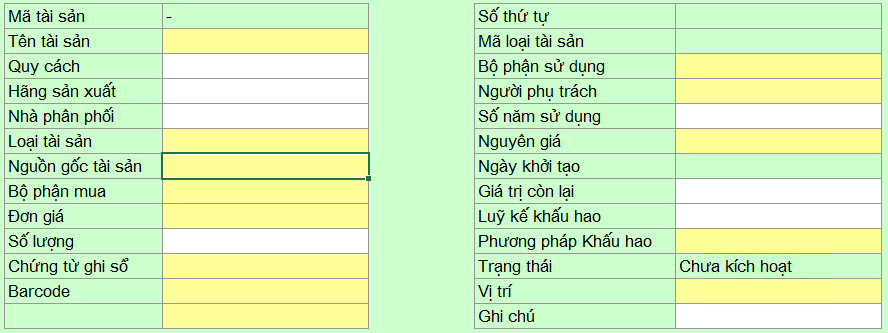
Entry Phase: Declare Asset number, name, specifications, manufacturer, initial value, service life, procurement department, using department, depreciation method...
Activation Phase: Declare activation date, status, actual location, and attach vouchers.
- Responsible Person: The person directly using or managing the asset.
- Procurement Department: The department that owns the asset (budget source).
4. Fixed Asset Depreciation
Users must accumulate monthly depreciation via the depreciation table. Select an asset from the list and enter the corresponding depreciation amount for the current month. Once saved and approved, the system automatically updates the cumulative depreciation fund of that asset.
5. Borrowing Request
When an asset is transferred between departments, the using department, responsible person, and physical location change. This requires a formal approval process involving the owning department, the current using department, and the borrowing department.

Users submit the Borrowing Request form. Once approved, the system automatically updates the asset's new location data.
6. Asset Damage
When damage is discovered, the company must assess the severity, investigate the cause, and assign responsibility. Users fill out the "Damage Declaration" form. Upon approval, the system locks and changes the asset status to "Damaged".
7. Repair Record
Based on the damage assessment, management decides whether to scrap or repair. If repair is needed, fill out the repair record form and submit it for approval.

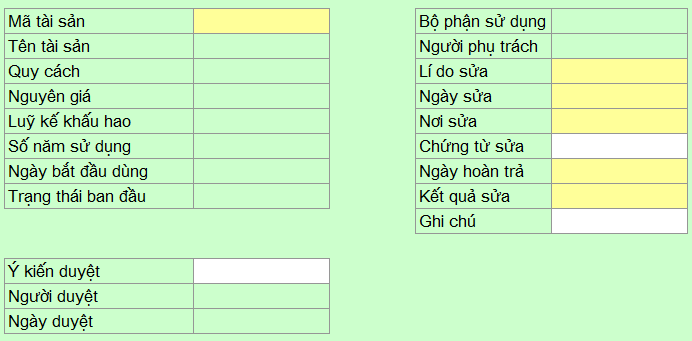
When the repair order is created, the asset status changes to "Under Repair". Upon receiving the repaired asset, the user updates the repair results to unlock the status.
8. Scrapping and Disposal
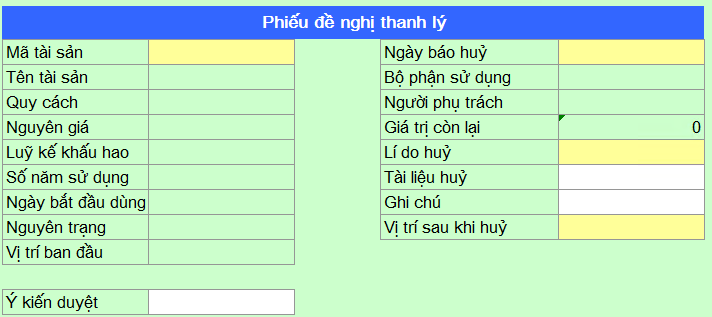
When an asset loses its useful value and needs to be disposed of, the user fills out a disposal application. The system will remove this asset from active inventory once the approval process is complete.